An inquiry comes through your website. Someone copies the details into a spreadsheet, forwards the email, sends a confirmation, and makes a note to follow up.
Those steps don’t take very long. But repeat them throughout the week, alongside scheduling, reminders, and reporting, and they start taking time away from other work.
That might mean less time serving customers, or it might mean a volunteer coordinator spends the afternoon updating lists instead of helping volunteers get involved.
Business automations can handle some of the repeated work that you find yourself doing over and over. The upside is fewer routine tasks for your team to remember and more time available for more involved work.
What exactly are business automations?
Business automations are tasks that happen automatically when something triggers them.
A website visitor submits a contact form, and their information goes into a shared contact list. An appointment reminder goes out. A follow-up becomes overdue, and the person responsible gets a notification.
You are in control of what should happen and when. The system then handles the repeatable steps.
Many automations work with clear rules and approved messages. They don’t need AI, and they don’t necessarily require replacing the tools you already use.
Where automation can save you time and money
Small teams often have the same person handling several responsibilities. An owner answers inquiries between jobs. A nonprofit director manages donor communication alongside programs and fundraising.
In that situation, even a small administrative task can interrupt something more important.
Automation can reduce time spent entering information, checking whether something happened, and reminding other people what needs attention. It can also make handoffs easier when someone is away or a volunteer changes roles.
The financial benefit depends on what actually changes.
Reducing paid overtime or outside administrative help can lower expenses. Giving an owner more time for billable work can create additional earning capacity. Helping a nonprofit reclaim volunteer hours can make more time available for its programs.
Time saved does not automatically become money saved. If payroll stays the same, the immediate benefit may be that your existing team can handle its work more comfortably.
Here’s a hypothetical example: a task takes five minutes and happens 12 times a day, five days a week. That adds up to five hours.
If automation handles most of those steps, there may be several hours to recover. You still need to subtract time spent reviewing exceptions and maintaining the process. Then compare the value of that time with the setup cost and ongoing fees.
That gives you a more useful answer than a broad promise that automation will “save money.”
Six common automations worth considering
1 Handling new inquiries
A website inquiry can start a series of routine steps: save the submission, send a confirmation, notify the right person, and create a follow-up task.
For a service business, that might be a request for an estimate. For a nonprofit, it could be someone asking about volunteering or becoming a sponsor.
The benefit is less forwarding and copying, plus a clearer record of what still needs a response.
An automatic confirmation also lets the sender know their message arrived. A person can then follow up with an answer that addresses what they actually asked.
2 Appointment event and volunteer reminders
Sending the same logistical information repeatedly takes time.
An appointment confirmation can include the location and preparation instructions. A volunteer shift reminder can explain when to arrive, where to park, and whom to contact. An event reminder can provide the details attendees would otherwise email to ask about.
These messages can be prepared in advance and sent at the appropriate time.
The setup should account for cancellations and schedule changes so people receive current information. There should also be a clear way to reach a person when something needs sorting out.
3 Customer and volunteer onboarding
After someone agrees to work with you, several predictable tasks often follow.
A new customer may need a welcome message, an information form, and a project folder. A new volunteer may need orientation details and a checklist of steps to complete.
Automation can prepare those materials and notify the person responsible for the next step. It can also flag missing information before someone has to search for it.
For a small team, this helps make the process easier to hand over. The instructions and next steps don’t have to live entirely in one person’s memory.
4 Invoice reminders and donor follow-up
Payment administration creates plenty of repeated checking.
A business can send reminders for outstanding invoices, with rules that stop those reminders once payment is recorded. A nonprofit can send a donation confirmation using verified transaction details and create a task for a personal thank-you.
That distinction matters. Routine communication can happen automatically while staff keep responsibility for the relationship.
A donor who has supported your organization for years may deserve a phone call. A customer disputing an invoice needs someone to understand the situation. The workflow should make those cases visible.
5 Keeping records up to date
If your team enters the same information in several places, there may be an opportunity to connect those steps.
An event registration could update an attendance list. A customer inquiry could create a contact record. A volunteer signup could add the information needed by a coordinator without another round of copying and pasting.
This can reduce duplicate entry and the mistakes that come with it.
Before connecting systems, decide which record should be treated as the main source. Otherwise, automation can move outdated or incorrect information around faster.
6 Recurring reports and summaries
Weekly reporting can involve opening several tools, gathering numbers, and assembling an update.
Automation can collect agreed information into a recurring summary. A small business might review new inquiries and outstanding follow-ups. A nonprofit might review event registrations, volunteer coverage, or donation activity.
The report should help someone make a decision. A list of unanswered inquiries is useful because someone can act on it. A report full of numbers nobody uses creates another thing to read.
The underlying records still need to be accurate, and someone should check that the summary reflects what is happening.
How I use automation at Haven Web Design
I use automation in my own business to help find potential agency partners.
A lot of my work involves providing development support for outside agencies. Finding agencies that might be a good fit takes research: looking through websites, understanding what services they offer, and collecting contact information.
I have an automation that runs weekly and handles that initial research. It looks for agencies offering web services or other services that could fit with what Haven Web Design provides. It scans their websites and updates a prospect spreadsheet with information such as the company name, website, and contact email when available.
From there, I manually review each prospect to decide whether there might be a good fit.
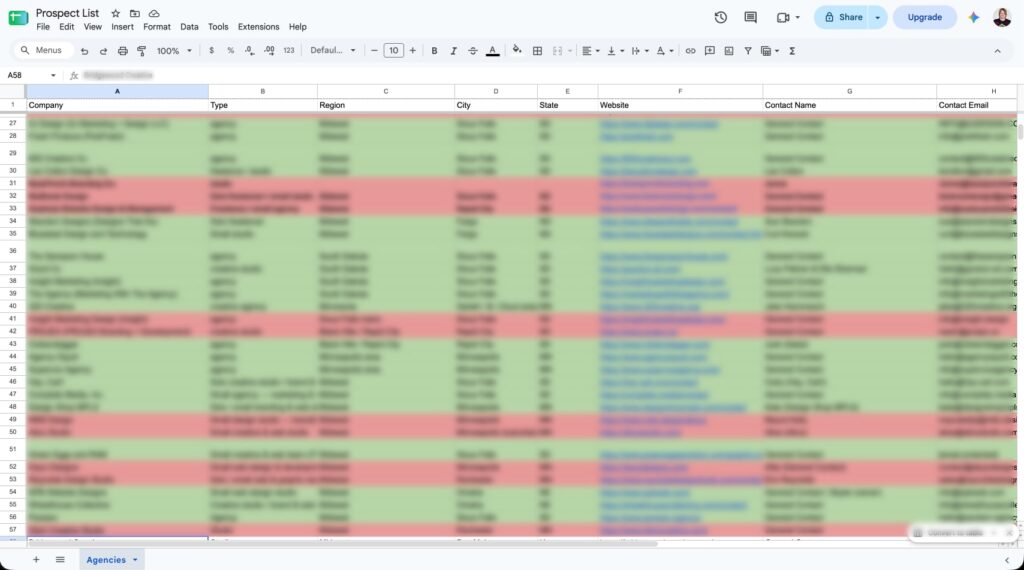
The prospect spreadsheet my weekly automation updates. Company and contact details are blurred.
This has been a huge time saver for me. The information is organized and ready to review, so I can spend more of my time considering potential working relationships instead of gathering details and entering them into a spreadsheet.
The same approach could help another small business research potential partners. A nonprofit could use a similar workflow to gather information about local businesses to review as possible event sponsors or community partners.
The useful part is having a starting point ready when you sit down to work. You still decide which opportunities deserve your attention and how to approach the people involved.
Do business automations need AI
No, many automations do not need AI.
Sending an appointment reminder at a scheduled time is a straightforward rule. So is saving a form submission or notifying someone about an overdue task.
AI becomes useful when a step involves interpreting information that doesn’t always arrive in the same format. For example, it can help:
- Summarize a long inquiry before a staff member responds.
- Suggest a category for an incoming request.
- Prepare a reply for someone to review.
- Turn collected notes into a draft internal update.
Consider a volunteer inquiry with several paragraphs about someone’s availability and interests. AI could prepare a short summary for the coordinator, with the original message available for reference.
That may make reviewing the inquiry quicker. The coordinator still decides what role makes sense.
AI-generated text can contain convincing errors, a risk identified in NIST’s guidance on generative AI. Review matters when a draft could misstate a policy, promise something to a customer, or misrepresent a donor’s wishes.
Before including private customer, donor, or volunteer information, also establish what the selected tool may receive and how that information will be handled.
Use AI where the assistance is useful enough to justify the review.
How to choose your first automation
Start with one task that happens regularly and has a clear, repeatable process.
Ask the people doing the work where they keep copying information, sending the same instructions, or chasing the next step. Those answers are often more useful than a list of software features.
Then work through a few practical questions:
- How often does the task happen, and how much hands-on time does it take?
- Which steps follow predictable rules?
- Which situations need a person’s judgment?
- Who will notice if something stops working?
Agree on what improvement would look like before building anything. That might be fewer minutes spent processing each registration or fewer inquiries waiting for a response.
Include setup, software fees, and ongoing support in the cost. After the automation is running, check whether it actually reduced the work.
A process with unclear responsibilities will still need clearer responsibilities. Automating it won’t resolve that by itself.
Give your team more time for the work that matters
For small businesses and nonprofits, a useful automation might be quite modest: a reminder that no longer needs to be sent manually, a signup that reaches the right person, or a report that arrives without an afternoon of preparation.
Those improvements matter when the same few people are responsible for keeping everything moving.
Haven Web Design builds automations for inquiry handling, follow-up, recordkeeping, recurring reports, and other repeated administrative tasks. The starting point is understanding what your team needs to happen.
If a task keeps taking time away from your customers, volunteers, or programs, bring us that task. We can look at what is practical and scope the work around it.